Overflow-y
Содержание:
Пример использования
<!DOCTYPE html>
<html>
<head>
<title>>Переполнение текстом элемента в CSS</title>
<style>
div {
width : 250px; /* задаём ширину блока */
border : 1px solid blue; /* задаём сплошную границу шириной 1px синего цвета */
background : azure; /* задаём цвет заднего фона  */
margin : 5px; /* указываем внешний отступ для всех сторон */
overflow : hidden; /* указываем, что при переполнении скрывать содержимое */
white-space : nowrap; /* перенос на новую строку не производится */
}
.test {
text-overflow:clip; /* текст обрезается по размеру области содержимого. */
}
.test2 {
text-overflow:ellipsis; /* добавляет троеточие, которое обозначает, что текст был обрезан */
}
.test3 {
text-overflow:""; /* добавляет "пользовательскую строку"(пользовательское значение), которое обозначает, что текст был обрезан */
}
.test4 {
text-overflow:"" ""; /* добавляет "пользовательскую строку"(пользовательское значение), которое обозначает, что текст был обрезан как в начале, так и конце элемента */
text-indent : -10px; /* задаем отрицательную красную строку */
}
</style>
</head>
	<body>
		<div class = "test">съешь же ещё этих мягких французских булок, да выпей чаю</div>
		<div class = "test2">съешь же ещё этих мягких французских булок, да выпей чаю</div>
		<div class = "test3">съешь же ещё этих мягких французских булок, да выпей чаю</div>
		<div class = "test4">съешь же ещё этих мягких французских булок, да выпей чаю</div>
	</body>
</html>
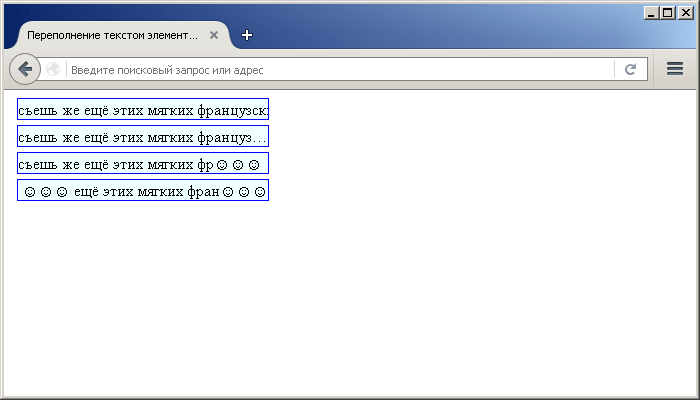
Пример использования свойства text-overflow(переполнение текстом элемента в CSS).CSS свойства
CSS Справочники
CSS СправочникCSS ПоддержкаCSS СелекторыCSS ФункцииCSS ЗвукCSS Веб шрифтыCSS АнимацииCSS ДлиныCSS Конвертер px-emCSS Названия цветаCSS Значения цветаCSS по умолчаниюCSS Символы
CSS Свойства
align-content
align-items
align-self
all
animation
animation-delay
animation-direction
animation-duration
animation-fill-mode
animation-iteration-count
animation-name
animation-play-state
animation-timing-function
backface-visibility
background
background-attachment
background-blend-mode
background-clip
background-color
background-image
background-origin
background-position
background-repeat
background-size
border
border-bottom
border-bottom-color
border-bottom-left-radius
border-bottom-right-radius
border-bottom-style
border-bottom-width
border-collapse
border-color
border-image
border-image-outset
border-image-repeat
border-image-slice
border-image-source
border-image-width
border-left
border-left-color
border-left-style
border-left-width
border-radius
border-right
border-right-color
border-right-style
border-right-width
border-spacing
border-style
border-top
border-top-color
border-top-left-radius
border-top-right-radius
border-top-style
border-top-width
border-width
bottom
box-decoration-break
box-shadow
box-sizing
caption-side
caret-color
@charset
clear
clip
color
column-count
column-fill
column-gap
column-rule
column-rule-color
column-rule-style
column-rule-width
column-span
column-width
columns
content
counter-increment
counter-reset
cursor
direction
display
empty-cells
filter
flex
flex-basis
flex-direction
flex-flow
flex-grow
flex-shrink
flex-wrap
float
font
@font-face
font-family
font-kerning
font-size
font-size-adjust
font-stretch
font-style
font-variant
font-weight
grid
grid-area
grid-auto-columns
grid-auto-flow
grid-auto-rows
grid-column
grid-column-end
grid-column-gap
grid-column-start
grid-gap
grid-row
grid-row-end
grid-row-gap
grid-row-start
grid-template
grid-template-areas
grid-template-columns
grid-template-rows
hanging-punctuation
height
hyphens
@import
isolation
justify-content
@keyframes
left
letter-spacing
line-height
list-style
list-style-image
list-style-position
list-style-type
margin
margin-bottom
margin-left
margin-right
margin-top
max-height
max-width
@media
min-height
min-width
mix-blend-mode
object-fit
object-position
opacity
order
outline
outline-color
outline-offset
outline-style
outline-width
overflow
overflow-x
overflow-y
padding
padding-bottom
padding-left
padding-right
padding-top
page-break-after
page-break-before
page-break-inside
perspective
perspective-origin
pointer-events
position
quotes
resize
right
tab-size
table-layout
text-align
text-align-last
text-decoration
text-decoration-color
text-decoration-line
text-decoration-style
text-indent
text-justify
text-overflow
text-shadow
text-transform
top
transform
transform-origin
transform-style
transition
transition-delay
transition-duration
transition-property
transition-timing-function
unicode-bidi
user-select
vertical-align
visibility
white-space
width
word-break
word-spacing
word-wrap
writing-mode
z-index
CSS Advanced
CSS Rounded CornersCSS Border ImagesCSS BackgroundsCSS ColorsCSS Color KeywordsCSS Gradients
Linear Gradients
Radial Gradients
CSS Shadows
Shadow Effects
Box Shadow
CSS Text EffectsCSS Web FontsCSS 2D TransformsCSS 3D TransformsCSS TransitionsCSS AnimationsCSS TooltipsCSS Style ImagesCSS Image ReflectionCSS object-fitCSS object-positionCSS ButtonsCSS PaginationCSS Multiple ColumnsCSS User InterfaceCSS Variables
The var() Function
Overriding Variables
Variables and JavaScript
Variables in Media Queries
CSS Box SizingCSS Media QueriesCSS MQ ExamplesCSS Flexbox
CSS Flexbox
CSS Flex Container
CSS Flex Items
CSS Flex Responsive
О свойстве Overflow
Каждый элемент на странице является прямоугольником. Размеры, позиционирование и поведение может регулироваться через CSS. Под поведением я подразумеваю как элемент обрабатывает события когда изменяется контент снаружи и внутри. Например, если вы не установили элементу высоту, то она будет увеличиваться пока в элементе не поместится весь контент. Но что случится когда вы все-таки установили высоту или ширину для элемента, а содержимое не поместилось? Здесь нам понадобится CSS-свойство overflow, которое позволяет вам указать как поступать в таких случаях. Всего существует четыре значения для этого свойства: visible (по умолчанию), hidden, scroll и auto. Также есть родственные свойства overflow-y и overflow-x, которые используются гораздо реже. Давайте рассмотрим поведение элементов с фиксированными размерами для каждого значения overflow и обсудим общие случаи использования.
Visible
Если вы не укажете свойство overflow, то по умолчанию оно будет равно visible. Итак, в основном, нет смысла явно устанавливать свойство в visible, до тех пор пока оно не будет перегружено его где-нибудь в другом месте, а вам потребуется поведение по умолчанию.
Здесь важно помнить, что даже если снаружи элемента есть видимый контент, этот контент не сместится на странице. Например:
В основном, вам не должно понадобиться устанавливать фиксированную высоту для элементов с текстом в них, поэтому таких ситуаций возникать не должно.
Hidden
Противоположное значение — hidden. В этом случае элемент прячет любой контент, который выходит за его границы.
Такое поведение особенно удобно для использования с динамическим контентом, возможности overflow позволяют избежать серьёзных проблем с вёрсткой макета. Однако, помните, что в этом случае контент скрыт и никаким способом он не станет доступным (кроме просмотра исходного текста страницы). Таким образом, если у пользователя размер шрифта по умолчанию больше, чем вы ожидали, текст может оказаться за пределами элемента и оказаться спрятанным от его глаз.
Scroll
Если элементу установленно значение scroll, то он будет скрывать непоместившееся содержимое, но появятся скроллбары, чтобы была возможность просмотреть весь контент.
Заметьте, что в этом случае вам будут показаны оба скроллбара, как горизонтальный, так и вертикальный, даже если для контента достаточно только одного из них.
Auto
Значение auto похоже на значение scroll, за исключением того, что скроллбары показываются, только там где они действительно необходимы.
CSS Properties
align-contentalign-itemsalign-selfallanimationanimation-delayanimation-directionanimation-durationanimation-fill-modeanimation-iteration-countanimation-nameanimation-play-stateanimation-timing-functionbackface-visibilitybackgroundbackground-attachmentbackground-blend-modebackground-clipbackground-colorbackground-imagebackground-originbackground-positionbackground-repeatbackground-sizeborderborder-bottomborder-bottom-colorborder-bottom-left-radiusborder-bottom-right-radiusborder-bottom-styleborder-bottom-widthborder-collapseborder-colorborder-imageborder-image-outsetborder-image-repeatborder-image-sliceborder-image-sourceborder-image-widthborder-leftborder-left-colorborder-left-styleborder-left-widthborder-radiusborder-rightborder-right-colorborder-right-styleborder-right-widthborder-spacingborder-styleborder-topborder-top-colorborder-top-left-radiusborder-top-right-radiusborder-top-styleborder-top-widthborder-widthbottombox-decoration-breakbox-shadowbox-sizingbreak-afterbreak-beforebreak-insidecaption-sidecaret-color@charsetclearclipclip-pathcolorcolumn-countcolumn-fillcolumn-gapcolumn-rulecolumn-rule-colorcolumn-rule-stylecolumn-rule-widthcolumn-spancolumn-widthcolumnscontentcounter-incrementcounter-resetcursordirectiondisplayempty-cellsfilterflexflex-basisflex-directionflex-flowflex-growflex-shrinkflex-wrapfloatfont@font-facefont-familyfont-feature-settingsfont-kerningfont-sizefont-size-adjustfont-stretchfont-stylefont-variantfont-variant-capsfont-weightgapgridgrid-areagrid-auto-columnsgrid-auto-flowgrid-auto-rowsgrid-columngrid-column-endgrid-column-gapgrid-column-startgrid-gapgrid-rowgrid-row-endgrid-row-gapgrid-row-startgrid-templategrid-template-areasgrid-template-columnsgrid-template-rowshanging-punctuationheighthyphens@importisolationjustify-content@keyframesleftletter-spacingline-heightlist-stylelist-style-imagelist-style-positionlist-style-typemarginmargin-bottommargin-leftmargin-rightmargin-topmax-heightmax-width@mediamin-heightmin-widthmix-blend-modeobject-fitobject-positionopacityorderoutlineoutline-coloroutline-offsetoutline-styleoutline-widthoverflowoverflow-xoverflow-ypaddingpadding-bottompadding-leftpadding-rightpadding-toppage-break-afterpage-break-beforepage-break-insideperspectiveperspective-originpointer-eventspositionquotesresizerightrow-gapscroll-behaviortab-sizetable-layouttext-aligntext-align-lasttext-decorationtext-decoration-colortext-decoration-linetext-decoration-styletext-indenttext-justifytext-overflowtext-shadowtext-transformtoptransformtransform-origintransform-styletransitiontransition-delaytransition-durationtransition-propertytransition-timing-functionunicode-bidiuser-selectvertical-alignvisibilitywhite-spacewidthword-breakword-spacingword-wrapwriting-modez-index
CSS Reference
CSS ReferenceCSS Browser SupportCSS SelectorsCSS FunctionsCSS Reference AuralCSS Web Safe FontsCSS Font FallbacksCSS AnimatableCSS UnitsCSS PX-EM ConverterCSS ColorsCSS Color ValuesCSS Default ValuesCSS Entities
CSS Properties
align-content
align-items
align-self
all
animation
animation-delay
animation-direction
animation-duration
animation-fill-mode
animation-iteration-count
animation-name
animation-play-state
animation-timing-function
backface-visibility
background
background-attachment
background-blend-mode
background-clip
background-color
background-image
background-origin
background-position
background-repeat
background-size
border
border-bottom
border-bottom-color
border-bottom-left-radius
border-bottom-right-radius
border-bottom-style
border-bottom-width
border-collapse
border-color
border-image
border-image-outset
border-image-repeat
border-image-slice
border-image-source
border-image-width
border-left
border-left-color
border-left-style
border-left-width
border-radius
border-right
border-right-color
border-right-style
border-right-width
border-spacing
border-style
border-top
border-top-color
border-top-left-radius
border-top-right-radius
border-top-style
border-top-width
border-width
bottom
box-decoration-break
box-shadow
box-sizing
break-after
break-before
break-inside
caption-side
caret-color
@charset
clear
clip
clip-path
color
column-count
column-fill
column-gap
column-rule
column-rule-color
column-rule-style
column-rule-width
column-span
column-width
columns
content
counter-increment
counter-reset
cursor
direction
display
empty-cells
filter
flex
flex-basis
flex-direction
flex-flow
flex-grow
flex-shrink
flex-wrap
float
font
@font-face
font-family
font-feature-settings
font-kerning
font-size
font-size-adjust
font-stretch
font-style
font-variant
font-variant-caps
font-weight
gap
grid
grid-area
grid-auto-columns
grid-auto-flow
grid-auto-rows
grid-column
grid-column-end
grid-column-gap
grid-column-start
grid-gap
grid-row
grid-row-end
grid-row-gap
grid-row-start
grid-template
grid-template-areas
grid-template-columns
grid-template-rows
hanging-punctuation
height
hyphens
@import
isolation
justify-content
@keyframes
left
letter-spacing
line-height
list-style
list-style-image
list-style-position
list-style-type
margin
margin-bottom
margin-left
margin-right
margin-top
max-height
max-width
@media
min-height
min-width
mix-blend-mode
object-fit
object-position
opacity
order
outline
outline-color
outline-offset
outline-style
outline-width
overflow
overflow-x
overflow-y
padding
padding-bottom
padding-left
padding-right
padding-top
page-break-after
page-break-before
page-break-inside
perspective
perspective-origin
pointer-events
position
quotes
resize
right
row-gap
scroll-behavior
tab-size
table-layout
text-align
text-align-last
text-decoration
text-decoration-color
text-decoration-line
text-decoration-style
text-indent
text-justify
text-overflow
text-shadow
text-transform
top
transform
transform-origin
transform-style
transition
transition-delay
transition-duration
transition-property
transition-timing-function
unicode-bidi
user-select
vertical-align
visibility
white-space
width
word-break
word-spacing
word-wrap
writing-mode
z-index
overflow-x и overflow-y
Свойства overflow-x hidden и overflow-yзадают, как содержимое, выходящее за рамки контейнера, отображается в горизонтальном и вертикальном направлении. Для них можно задать все шесть значений, описанных выше.
Давайте рассмотрим примеры.
HTML
<div id="box">
	<div id="inner_box"></div>
</div>
Если ширина внешнего блока составляет 200 пикселей, а внутреннего — 250 пикселей, то задав для внешнего блока overflow-x: auto, мы добавим в него горизонтальную полосу прокрутки, так как ширина содержимого превышает ширину блока.
Если высота внешнего блока 100 пикселей, а высота внутреннего блока — 150 пикселей, то overflow-y: auto добавляет вертикальную полосу прокрутки.
CSS Overflow
The property specifies whether to clip
the content or
to add scrollbars when the content of an element is too big to fit in the specified
area.
The property has the following values:
-
— Default. The overflow is not clipped.
The content renders outside the element’s box - — The overflow is clipped, and the rest of the content will be invisible
- — The overflow is clipped, and a scrollbar is added to see the rest of the content
-
— Similar to ,
but it adds scrollbars only when necessary
Note: The property only works for block elements with a specified height.
Note: In OS X Lion (on Mac), scrollbars are hidden by default and only shown when being used (even though «overflow:scroll» is set).
Possible Values
The property is shorthand, and accepts one or two keywords (below). If it has one keyword, that keyword sets both and ; if it has two keywords, it sets to the first and to the second
- Specifies that the content should not be clipped. In other words, it should be displayed outside the content box.
- Specifies that the content is clipped (i.e. the parts that extend beyond the content box are hidden), and no scroll bars (or other scrolling mechanism) are supplied.
- Specifies that the content box should provide scroll bars (or other scrolling mechanism) regardless of whether the content is clipped or not.
- Specifies that the content box should provide scroll bars (or other scrolling mechanism) only when the content overflows (i.e. is too big to fit within the content box).
In addition, all CSS properties also accept the following CSS-wide keyword values as the sole component of their property value:
- Represents the value specified as the property’s initial value.
- Represents the computed value of the property on the element’s parent.
- This value acts as either or , depending on whether the property is inherited or not. In other words, it sets all properties to their parent value if they are inheritable or to their initial value if not inheritable.
Поддержка браузерами
| Значение | Chrome | Firefox | Opera | Safari | IExplorer | Edge |
|---|---|---|---|---|---|---|
| clip | ellipsis | 4.0 | 7.0 | 11.09.0 -o- | 3.1 | 6.0 | 12.0 |
| string(пользовательская строка) | Нет | 9.0 | Нет | Нет | Нет | Нет |
| 2 value(обе стороны) | Нет | 9.0 | Нет | Нет | Нет | Нет |
CSS синтаксис:
text-overflow:"clip | ellipsis | string | initial | inherit";

Значение string(пользовательская строка) поддерживается только в Firefox.
text-overflow:"///";
text-overflow:"..";
text-overflow:""; и т.п.
Два значения для свойства (начало/конец элемента) поддерживается только в Firefox.
text-overflow:"" "";
text-overflow:clip ellipsis; и т.п.
JavaScript синтаксис:
object.style.textOverflow = "clip"
Images
SlideshowSlideshow GalleryModal ImagesLightboxResponsive Image GridImage GridTab GalleryImage Overlay FadeImage Overlay SlideImage Overlay ZoomImage Overlay TitleImage Overlay IconImage EffectsBlack and White ImageImage TextImage Text BlocksTransparent Image TextFull Page ImageForm on ImageHero ImageBlur Background ImageChange Bg on ScrollSide-by-Side ImagesRounded ImagesAvatar ImagesResponsive ImagesCenter ImagesThumbnailsBorder Around ImageMeet the TeamSticky ImageFlip an ImageShake an ImagePortfolio GalleryPortfolio with FilteringImage ZoomImage Magnifier GlassImage Comparison Slider
Очистка Float
Как ни странно, одним из наиболее популярных способов использования является очистка свойства .
Проблема встречается в следующем: когда вы помещаете в элемент дочерний элемент с установленным свойством (плавающий), то родительский элемент не растягивается, чтобы охватить дочерний элемент, а сворачивается, не учитывая его. Это бывает проблемой, например, когда у родительского элемента задан фон или рамка.
На примере это наглядно видно. Внутри родительского элемента (в синей рамке) помещен элемент с текстом и установленным свойством . Родительский элемент при этом свернулся.
See the Pen
overflow float by Андрей (@adlibi)
on CodePen.
Элемент с установленным свойством переполнением (любое значение, кроме ) будет расширяться настолько, насколько необходимо, чтобы охватить все дочерние элементы внутри его, которые являются плавающими. Ниже тот же пример, но с установленным для родителя свойством :
See the Pen
overflow float 2 by Андрей (@adlibi)
on CodePen.
overflow-x and overflow-y
The and properties specifies
whether to change the overflow of content just horizontally or vertically (or
both):
specifies what to do with the left/right edges of the
content. specifies what to do with the top/bottom edges of the
content.
You can use the overflow property when you want to have better control of the layout. The overflow property specifies what happens if content overflows an element’s box.
Example
div { overflow-x: hidden; /* Hide horizontal scrollbar
*/ overflow-y: scroll; /* Add vertical scrollbar */}
All CSS Overflow Properties
| Property | Description |
|---|---|
| overflow | Specifies what happens if content overflows an element’s box |
| overflow-x | Specifies what to do with the left/right edges of the content if it overflows the element’s content area |
| overflow-y | Specifies what to do with the top/bottom edges of the content if it overflows the element’s content area |
❮ Previous
Next ❯
CSS Reference
CSS ReferenceCSS Browser SupportCSS SelectorsCSS FunctionsCSS Reference AuralCSS Web Safe FontsCSS Font FallbacksCSS AnimatableCSS UnitsCSS PX-EM ConverterCSS ColorsCSS Color ValuesCSS Default ValuesCSS Entities
CSS Properties
align-content
align-items
align-self
all
animation
animation-delay
animation-direction
animation-duration
animation-fill-mode
animation-iteration-count
animation-name
animation-play-state
animation-timing-function
backface-visibility
background
background-attachment
background-blend-mode
background-clip
background-color
background-image
background-origin
background-position
background-repeat
background-size
border
border-bottom
border-bottom-color
border-bottom-left-radius
border-bottom-right-radius
border-bottom-style
border-bottom-width
border-collapse
border-color
border-image
border-image-outset
border-image-repeat
border-image-slice
border-image-source
border-image-width
border-left
border-left-color
border-left-style
border-left-width
border-radius
border-right
border-right-color
border-right-style
border-right-width
border-spacing
border-style
border-top
border-top-color
border-top-left-radius
border-top-right-radius
border-top-style
border-top-width
border-width
bottom
box-decoration-break
box-shadow
box-sizing
break-after
break-before
break-inside
caption-side
caret-color
@charset
clear
clip
clip-path
color
column-count
column-fill
column-gap
column-rule
column-rule-color
column-rule-style
column-rule-width
column-span
column-width
columns
content
counter-increment
counter-reset
cursor
direction
display
empty-cells
filter
flex
flex-basis
flex-direction
flex-flow
flex-grow
flex-shrink
flex-wrap
float
font
@font-face
font-family
font-feature-settings
font-kerning
font-size
font-size-adjust
font-stretch
font-style
font-variant
font-variant-caps
font-weight
gap
grid
grid-area
grid-auto-columns
grid-auto-flow
grid-auto-rows
grid-column
grid-column-end
grid-column-gap
grid-column-start
grid-gap
grid-row
grid-row-end
grid-row-gap
grid-row-start
grid-template
grid-template-areas
grid-template-columns
grid-template-rows
hanging-punctuation
height
hyphens
@import
isolation
justify-content
@keyframes
left
letter-spacing
line-height
list-style
list-style-image
list-style-position
list-style-type
margin
margin-bottom
margin-left
margin-right
margin-top
max-height
max-width
@media
min-height
min-width
mix-blend-mode
object-fit
object-position
opacity
order
outline
outline-color
outline-offset
outline-style
outline-width
overflow
overflow-x
overflow-y
padding
padding-bottom
padding-left
padding-right
padding-top
page-break-after
page-break-before
page-break-inside
perspective
perspective-origin
pointer-events
position
quotes
resize
right
row-gap
scroll-behavior
tab-size
table-layout
text-align
text-align-last
text-decoration
text-decoration-color
text-decoration-line
text-decoration-style
text-indent
text-justify
text-overflow
text-shadow
text-transform
top
transform
transform-origin
transform-style
transition
transition-delay
transition-duration
transition-property
transition-timing-function
unicode-bidi
user-select
vertical-align
visibility
white-space
width
word-break
word-spacing
word-wrap
writing-mode
z-index